> ## Documentation Index
> Fetch the complete documentation index at: https://docs.omnifact.ai/llms.txt
> Use this file to discover all available pages before exploring further.
# Understanding AI Assistants
> Learn how AI assistants work and how they can enhance your professional work
export const Glossary = ({children, term}) => {
const glossaryDefinitions = {
'ai': 'Artificial Intelligence - computer systems that can perform tasks typically requiring human intelligence',
'artificial-intelligence-ai': 'Computer systems that can perform tasks typically requiring human intelligence',
'ai-assistant': 'An AI system designed to help users with tasks through conversation',
'space': 'A dedicated environment with a specialized AI assistant and optional Uploaded Files',
'spaces': 'Dedicated environments with specialized AI assistants and optional Uploaded Files',
'knowledge': 'The sub-menu in Space settings where you manage Uploaded Files and Connected Sources',
'uploaded-files': 'Documents manually uploaded to a Space under the Knowledge tab',
'prompt': 'Instructions or questions you give to an AI assistant',
'response': 'The AI assistant\'s answer to your prompt or question',
'query': 'A question or request for information',
'context': 'Background information that helps the AI understand your request',
'llm': 'Large Language Model - an AI system trained on vast amounts of text data to understand and generate human language',
'large-language-model-llm': 'An AI system trained on vast amounts of text data to understand and generate human language',
'privacy-filter': 'A system that automatically detects and masks sensitive information before it reaches AI models, and restricts images from being sent to non-EU hosted models for compliance',
'chat-instructions': 'Custom guidelines that define how an AI assistant behaves and responds in a Space',
'pattern-matching': 'The process by which AI recognizes and uses patterns in data to provide responses',
'patterns': 'Recognizable structures or trends in data that AI systems can identify and use',
'training-data': 'The text and information used to teach an AI system how to understand and respond to requests',
'natural-language': 'Everyday human language that people use to communicate, as opposed to computer code or formal syntax',
'hallucination': 'When an AI generates information that sounds plausible but is actually incorrect or fabricated',
'filtering': 'The process of automatically detecting and temporarily replacing sensitive information to protect it during AI processing',
'masking': 'Temporarily replacing sensitive information with generic labels to protect it from being seen by external AI models',
're-insertion': 'The automatic process of putting original sensitive information back into AI responses after they\'ve been generated with filtered data',
'retrieval': 'The process of finding and accessing relevant documents from Uploaded Files to answer questions',
'hosting': 'Where an AI model is deployed and made available for use - either by third-party providers, on your organization\'s own servers, or in private cloud environments',
'cite': 'To reference or mention the source of information, helping you know where an AI\'s answer came from',
'sidebar': 'A panel that appears on the side of the screen showing additional information and options',
'toggle': 'A button or control that switches something on or off, like opening and closing a sidebar',
'navigation': 'The system of menus and buttons that help you move between different parts of Omnifact',
'favoriting': 'Marking a Space as a favorite to pin it to the main navigation for quick access',
'pinning': 'Attaching a Space to the main navigation bar so it\'s always visible and easily accessible'
};
const definition = glossaryDefinitions[term];
return {children};
};
AI assistants are powerful tools designed to enhance your work life. Think of them as knowledgeable colleagues who can help with various tasks while understanding the context of your work.
## What Are AI Assistants?
AI assistants are specialized AI systems designed to interact with users in natural language to help accomplish tasks. Unlike simple chatbots, they can understand context, maintain conversations, and provide nuanced assistance across various professional tasks.
Communicate in plain language, just like talking to a colleague
Remember previous conversations and maintain context
Designed specifically for professional work tasks
Can switch between different types of tasks easily
## A Day in the Life of an AI Assistant
See how an AI assistant supports you throughout a typical workday, from document analysis to writing help and research support. These real-world examples demonstrate how AI can enhance your daily workflow.
**Example Task:** Summarizing a long report
**What AI Does:**
1. Reads through the document
2. Identifies main points and themes
3. Organizes key information
4. Creates a clear summary
**Like:** A skilled assistant quickly reading and summarizing a document for you
**Example Task:** Drafting an email
**What AI Does:**
1. Understands the message goal
2. Considers the audience
3. Drafts appropriate content
4. Maintains professional tone
**Like:** A communications expert helping you write effectively
**Example Task:** Answering questions about a topic
**What AI Does:**
1. Recalls relevant information
2. Combines multiple sources
3. Provides clear explanations
4. Suggests related topics
**Like:** A knowledgeable colleague helping you understand a topic
## How AI Assistants Think
Understanding how AI assistants process information helps you work with them more effectively:
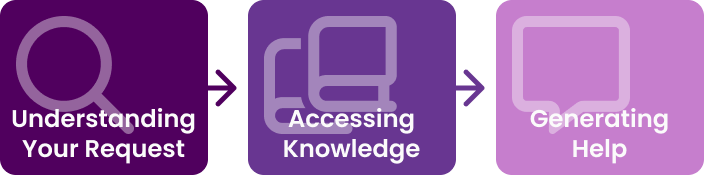 The AI assistant analyzes your message to identify:
* The main task or question
* Important context and details
* Any specific requirements
It then draws from:
* Its general training
* Your uploaded documents (or using Omnifact's [Spaces](/en/platform/core-features/spaces/introduction))
* Previous conversations
Finally, it:
* Combines relevant information
* Formats it appropriately
* Provides a clear response
## Memory vs. Context: How AI Remembers
It's common to be confused about what the AI "remembers." Here is the simple rule:
* **Short-term Memory (The Chat):** The AI remembers everything in the *current* conversation thread. It knows you asked about "marketing reports" three messages ago.
* **No Long-term Memory (Between Chats):** When you start a **New Chat**, the AI forgets the previous conversation completely. It does not remember you are a Marketing Manager unless you tell it again or it is in your [profile](/en/platform/core-features/account-settings/user-profile-and-personalization) or instructions.
**The "Reset Button" Feature:**
Clicking "New Chat" wipes the slate clean. This is a feature, not a bug! It ensures privacy and freshness, preventing old topics from confusing new tasks.
## The Omnifact Difference
* We put privacy first by automatically protecting sensitive information with our [Privacy Filter](/en/platform/core-features/privacy-security/how-privacy-filter-works)
* We understand business context through professional needs and communication styles via [natural conversations](/en/platform/core-features/chats/conversational-flow)
* We integrate knowledge by connecting with your organization's documents through [Uploaded Files Retrieval](/en/platform/core-features/spaces/uploaded-files-retrieval)
* We ensure secure and tailored access through **Groups**. Your team administrator assigns you to specific groups, which govern your permissions and determine which capabilities (like web search or image generation) and which AI models (Base, Standard, or Premium tiers) you can use.
* We support teams by facilitating collaboration through [shared Spaces](/en/platform/core-features/spaces/sharing-spaces)
Omnifact enhances standard AI capabilities with features specifically designed for professional use.
## Common Questions
Yes, AI assistants can make mistakes. Always review their output, especially for important tasks. They work best as collaborators rather than autonomous decision-makers.
More context generally leads to better results. Include relevant background information, specific requirements, and any preferences about the format or style of the response.
Try rephrasing your request, breaking it into smaller parts, or providing more context. You can also ask the AI to explain what it didn't understand.
Remember, your AI assistant is a powerful tool, but it works best as a collaborative partner. Combine its capabilities with your expertise and judgment for the best results.
## Next Steps
Now that you understand AI assistants, explore these topics to learn more:
* Learn about [How AI Works](/en/guides/ai-fundamentals/how-ai-works) and the technology behind AI assistants
* Discover [AI Capabilities and Limitations](/en/guides/ai-fundamentals/capabilities-and-limitations) to set realistic expectations
* Master [How to Interact with AI](/en/guides/ai-fundamentals/how-to-interact) to communicate effectively
* Check the [Glossary](/en/guides/ai-fundamentals/glossary) if you encountered any unfamiliar terms
The AI assistant analyzes your message to identify:
* The main task or question
* Important context and details
* Any specific requirements
It then draws from:
* Its general training
* Your uploaded documents (or using Omnifact's [Spaces](/en/platform/core-features/spaces/introduction))
* Previous conversations
Finally, it:
* Combines relevant information
* Formats it appropriately
* Provides a clear response
## Memory vs. Context: How AI Remembers
It's common to be confused about what the AI "remembers." Here is the simple rule:
* **Short-term Memory (The Chat):** The AI remembers everything in the *current* conversation thread. It knows you asked about "marketing reports" three messages ago.
* **No Long-term Memory (Between Chats):** When you start a **New Chat**, the AI forgets the previous conversation completely. It does not remember you are a Marketing Manager unless you tell it again or it is in your [profile](/en/platform/core-features/account-settings/user-profile-and-personalization) or instructions.
**The "Reset Button" Feature:**
Clicking "New Chat" wipes the slate clean. This is a feature, not a bug! It ensures privacy and freshness, preventing old topics from confusing new tasks.
## The Omnifact Difference
* We put privacy first by automatically protecting sensitive information with our [Privacy Filter](/en/platform/core-features/privacy-security/how-privacy-filter-works)
* We understand business context through professional needs and communication styles via [natural conversations](/en/platform/core-features/chats/conversational-flow)
* We integrate knowledge by connecting with your organization's documents through [Uploaded Files Retrieval](/en/platform/core-features/spaces/uploaded-files-retrieval)
* We ensure secure and tailored access through **Groups**. Your team administrator assigns you to specific groups, which govern your permissions and determine which capabilities (like web search or image generation) and which AI models (Base, Standard, or Premium tiers) you can use.
* We support teams by facilitating collaboration through [shared Spaces](/en/platform/core-features/spaces/sharing-spaces)
Omnifact enhances standard AI capabilities with features specifically designed for professional use.
## Common Questions
Yes, AI assistants can make mistakes. Always review their output, especially for important tasks. They work best as collaborators rather than autonomous decision-makers.
More context generally leads to better results. Include relevant background information, specific requirements, and any preferences about the format or style of the response.
Try rephrasing your request, breaking it into smaller parts, or providing more context. You can also ask the AI to explain what it didn't understand.
Remember, your AI assistant is a powerful tool, but it works best as a collaborative partner. Combine its capabilities with your expertise and judgment for the best results.
## Next Steps
Now that you understand AI assistants, explore these topics to learn more:
* Learn about [How AI Works](/en/guides/ai-fundamentals/how-ai-works) and the technology behind AI assistants
* Discover [AI Capabilities and Limitations](/en/guides/ai-fundamentals/capabilities-and-limitations) to set realistic expectations
* Master [How to Interact with AI](/en/guides/ai-fundamentals/how-to-interact) to communicate effectively
* Check the [Glossary](/en/guides/ai-fundamentals/glossary) if you encountered any unfamiliar terms