> ## Documentation Index
> Fetch the complete documentation index at: https://docs.omnifact.ai/llms.txt
> Use this file to discover all available pages before exploring further.
# Welcome to Omnifact
> Your AI for the workplace — helping you work smarter, not harder
export const Glossary = ({children, term}) => {
const glossaryDefinitions = {
'ai': 'Artificial Intelligence - computer systems that can perform tasks typically requiring human intelligence',
'artificial-intelligence-ai': 'Computer systems that can perform tasks typically requiring human intelligence',
'ai-assistant': 'An AI system designed to help users with tasks through conversation',
'space': 'A dedicated environment with a specialized AI assistant and optional Knowledge Base',
'knowledge': 'The sub-menu in Space settings where you manage Uploaded Files and Connected Sources',
'knowledge-base': 'The collection of documents in a Space (from Uploaded Files and Connected Sources) that the AI assistant can retrieve',
'uploaded-files': 'Documents manually uploaded to a Space under the Knowledge tab',
'prompt': 'Instructions or questions you give to an AI assistant',
'response': 'The AI assistant\'s answer to your prompt or question',
'query': 'A question or request for information',
'context': 'Background information that helps the AI understand your request',
'llm': 'Large Language Model - an AI system trained on vast amounts of text data to understand and generate human language',
'large-language-model-llm': 'An AI system trained on vast amounts of text data to understand and generate human language',
'privacy-filter': 'A system that automatically detects and masks sensitive information before it reaches AI models, and restricts images from being sent to non-EU hosted models for compliance',
'chat-instructions': 'Custom guidelines that define how an AI assistant behaves and responds in a Space',
'pattern-matching': 'The process by which AI recognizes and uses patterns in data to provide responses',
'patterns': 'Recognizable structures or trends in data that AI systems can identify and use',
'training-data': 'The text and information used to teach an AI system how to understand and respond to requests',
'natural-language': 'Everyday human language that people use to communicate, as opposed to computer code or formal syntax',
'hallucination': 'When an AI generates information that sounds plausible but is actually incorrect or fabricated',
'filtering': 'The process of automatically detecting and temporarily replacing sensitive information to protect it during AI processing',
'masking': 'Temporarily replacing sensitive information with generic labels to protect it from being seen by external AI models',
're-insertion': 'The automatic process of putting original sensitive information back into AI responses after they\'ve been generated with filtered data',
'retrieval': 'The process of finding and accessing relevant documents from Uploaded Files to answer questions',
'hosting': 'Where an AI model is deployed and made available for use - either by third-party providers, on your organization\'s own servers, or in private cloud environments',
'cite': 'To reference or mention the source of information, helping you know where an AI\'s answer came from',
'sidebar': 'A panel that appears on the side of the screen showing additional information and options',
'toggle': 'A button or control that switches something on or off, like opening and closing a sidebar',
'navigation': 'The system of menus and buttons that help you move between different parts of Omnifact',
'favoriting': 'Marking a Space as a favorite to pin it to the main navigation for quick access',
'pinning': 'Attaching a Space to the main navigation bar so it\'s always visible and easily accessible'
};
const definition = glossaryDefinitions[term];
return {children};
};
 ## Empower Your Workforce with Secure AI
Omnifact is your secure and user-friendly AI platform, designed to empower professionals like you. Think of it as a personal AI assistant that streamlines your everyday tasks, answers questions using your company's internal data, and boosts productivity across your entire organization.
## Why Choose Omnifact?
Unlike public AI tools, we prioritize **data privacy and security** while delivering an enterprise-grade experience. You can confidently use Omnifact with sensitive company information, knowing it remains protected and compliant.
* **Privacy-first:** Built-in safeguards like data masking, Click to Reveal, and a strict no-scan policy ensure your data is never used to train models.
* **Secure and compliant:** Designed to meet rigorous standards including GDPR and the EU AI Act, with flexible deployment options to suit your organization's needs.
* **Customizable:** Create tailored AI assistants using Spaces and empower them with custom Knowledge Base for your specific workflows.
* **Productivity-focused:** Accelerate your work with instant answers, real-time web search, image generation, and task automation capabilities.
* **Collaborative:** Work seamlessly with your team in shared Spaces and build collective Knowledge Base for unified problem-solving.
* **Vendor-independent:** Avoid lock-in by accessing multiple top-tier AI models from different providers through a single, unified interface.
* **User-friendly and accessible:** Enjoy a smooth experience with a guided onboarding process, deep personalization, and helpful example prompts.
## Key Benefits of Omnifact
Handle routine tasks like writing emails, summarizing documents, and
formatting data so you can focus on high-value work.
Get better insights and data-driven support to help you make better
decisions in your daily work.
Ask questions, seek advice, solve problems, and benefit from AI-driven
mentorship to foster your professional growth.
Find information quickly across documents and the web, saving you from
endless searches through folders and drives.
Work confidently with our [Privacy Filter](/en/platform/core-features/privacy-security/how-privacy-filter-works) that automatically protects sensitive information like personal data and company secrets, and restricts images from being sent to non-EU hosted models for compliance.
Work together with colleagues in focused AI environments through Spaces,
enabling knowledge sharing and collective problem-solving.
## Who is Omnifact For?
Omnifact is designed for professionals in medium to large organizations across all departments, whether you work in marketing, HR, accounting, legal, or general office roles. You don't need to know anything about AI to use Omnifact effectively — we've made sure to make it intuitive and approachable for everyone.
## Empower Your Workforce with Secure AI
Omnifact is your secure and user-friendly AI platform, designed to empower professionals like you. Think of it as a personal AI assistant that streamlines your everyday tasks, answers questions using your company's internal data, and boosts productivity across your entire organization.
## Why Choose Omnifact?
Unlike public AI tools, we prioritize **data privacy and security** while delivering an enterprise-grade experience. You can confidently use Omnifact with sensitive company information, knowing it remains protected and compliant.
* **Privacy-first:** Built-in safeguards like data masking, Click to Reveal, and a strict no-scan policy ensure your data is never used to train models.
* **Secure and compliant:** Designed to meet rigorous standards including GDPR and the EU AI Act, with flexible deployment options to suit your organization's needs.
* **Customizable:** Create tailored AI assistants using Spaces and empower them with custom Knowledge Base for your specific workflows.
* **Productivity-focused:** Accelerate your work with instant answers, real-time web search, image generation, and task automation capabilities.
* **Collaborative:** Work seamlessly with your team in shared Spaces and build collective Knowledge Base for unified problem-solving.
* **Vendor-independent:** Avoid lock-in by accessing multiple top-tier AI models from different providers through a single, unified interface.
* **User-friendly and accessible:** Enjoy a smooth experience with a guided onboarding process, deep personalization, and helpful example prompts.
## Key Benefits of Omnifact
Handle routine tasks like writing emails, summarizing documents, and
formatting data so you can focus on high-value work.
Get better insights and data-driven support to help you make better
decisions in your daily work.
Ask questions, seek advice, solve problems, and benefit from AI-driven
mentorship to foster your professional growth.
Find information quickly across documents and the web, saving you from
endless searches through folders and drives.
Work confidently with our [Privacy Filter](/en/platform/core-features/privacy-security/how-privacy-filter-works) that automatically protects sensitive information like personal data and company secrets, and restricts images from being sent to non-EU hosted models for compliance.
Work together with colleagues in focused AI environments through Spaces,
enabling knowledge sharing and collective problem-solving.
## Who is Omnifact For?
Omnifact is designed for professionals in medium to large organizations across all departments, whether you work in marketing, HR, accounting, legal, or general office roles. You don't need to know anything about AI to use Omnifact effectively — we've made sure to make it intuitive and approachable for everyone.
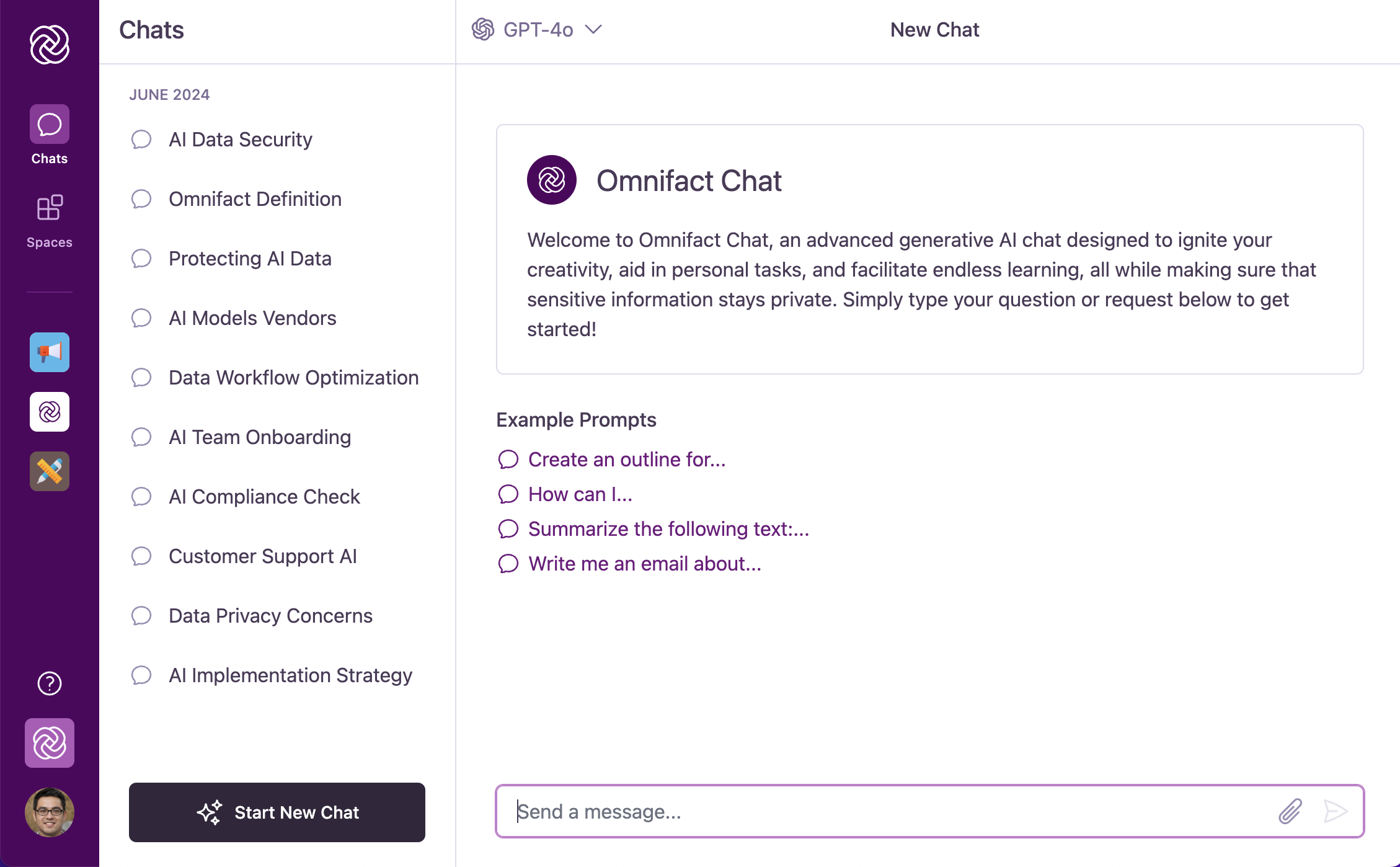 The Omnifact interface is designed for clarity and efficient navigation. On the left, you'll find the main navigation bar for accessing [Chats](/en/platform/core-features/chats/introduction), [Spaces](/en/platform/core-features/spaces/introduction), [Team Settings](/en/platform/team-administration/company-profile), and your [profile settings](/en/platform/core-features/account-settings/user-profile-and-personalization). The main content area on the right is where you'll have conversations with the AI assistant.
## Start Your Journey
Using Omnifact is as simple as having a conversation. Just type your requests in everyday language, and get immediate, helpful responses.
Get up and running with Omnifact in minutes.
Deep dive into Chats, Spaces, and more.
The Omnifact interface is designed for clarity and efficient navigation. On the left, you'll find the main navigation bar for accessing [Chats](/en/platform/core-features/chats/introduction), [Spaces](/en/platform/core-features/spaces/introduction), [Team Settings](/en/platform/team-administration/company-profile), and your [profile settings](/en/platform/core-features/account-settings/user-profile-and-personalization). The main content area on the right is where you'll have conversations with the AI assistant.
## Start Your Journey
Using Omnifact is as simple as having a conversation. Just type your requests in everyday language, and get immediate, helpful responses.
Get up and running with Omnifact in minutes.
Deep dive into Chats, Spaces, and more.