> ## Documentation Index
> Fetch the complete documentation index at: https://docs.omnifact.ai/llms.txt
> Use this file to discover all available pages before exploring further.
# Conversational Flow & Follow-Up Questions
> Learn how to have natural conversations with Omnifact and ask effective follow-up questions
export const Glossary = ({children, term}) => {
const glossaryDefinitions = {
'ai': 'Artificial Intelligence - computer systems that can perform tasks typically requiring human intelligence',
'artificial-intelligence-ai': 'Computer systems that can perform tasks typically requiring human intelligence',
'ai-assistant': 'An AI system designed to help users with tasks through conversation',
'space': 'A dedicated environment with a specialized AI assistant and optional Uploaded Files',
'spaces': 'Dedicated environments with specialized AI assistants and optional Uploaded Files',
'knowledge': 'The sub-menu in Space settings where you manage Uploaded Files and Connected Sources',
'uploaded-files': 'Documents manually uploaded to a Space under the Knowledge tab',
'prompt': 'Instructions or questions you give to an AI assistant',
'response': 'The AI assistant\'s answer to your prompt or question',
'query': 'A question or request for information',
'context': 'Background information that helps the AI understand your request',
'llm': 'Large Language Model - an AI system trained on vast amounts of text data to understand and generate human language',
'large-language-model-llm': 'An AI system trained on vast amounts of text data to understand and generate human language',
'privacy-filter': 'A system that automatically detects and masks sensitive information before it reaches AI models, and restricts images from being sent to non-EU hosted models for compliance',
'chat-instructions': 'Custom guidelines that define how an AI assistant behaves and responds in a Space',
'pattern-matching': 'The process by which AI recognizes and uses patterns in data to provide responses',
'patterns': 'Recognizable structures or trends in data that AI systems can identify and use',
'training-data': 'The text and information used to teach an AI system how to understand and respond to requests',
'natural-language': 'Everyday human language that people use to communicate, as opposed to computer code or formal syntax',
'hallucination': 'When an AI generates information that sounds plausible but is actually incorrect or fabricated',
'filtering': 'The process of automatically detecting and temporarily replacing sensitive information to protect it during AI processing',
'masking': 'Temporarily replacing sensitive information with generic labels to protect it from being seen by external AI models',
're-insertion': 'The automatic process of putting original sensitive information back into AI responses after they\'ve been generated with filtered data',
'retrieval': 'The process of finding and accessing relevant documents from Uploaded Files to answer questions',
'hosting': 'Where an AI model is deployed and made available for use - either by third-party providers, on your organization\'s own servers, or in private cloud environments',
'cite': 'To reference or mention the source of information, helping you know where an AI\'s answer came from',
'sidebar': 'A panel that appears on the side of the screen showing additional information and options',
'toggle': 'A button or control that switches something on or off, like opening and closing a sidebar',
'navigation': 'The system of menus and buttons that help you move between different parts of Omnifact',
'favoriting': 'Marking a Space as a favorite to pin it to the main navigation for quick access',
'pinning': 'Attaching a Space to the main navigation bar so it\'s always visible and easily accessible'
};
const definition = glossaryDefinitions[term];
return {children};
};
Omnifact is designed to work like a natural conversation, allowing you to communicate with the AI assistant just as you would with a colleague. Understanding how conversation flow works in Omnifact will help you get the most out of your interactions.
## How Conversation Works in Omnifact
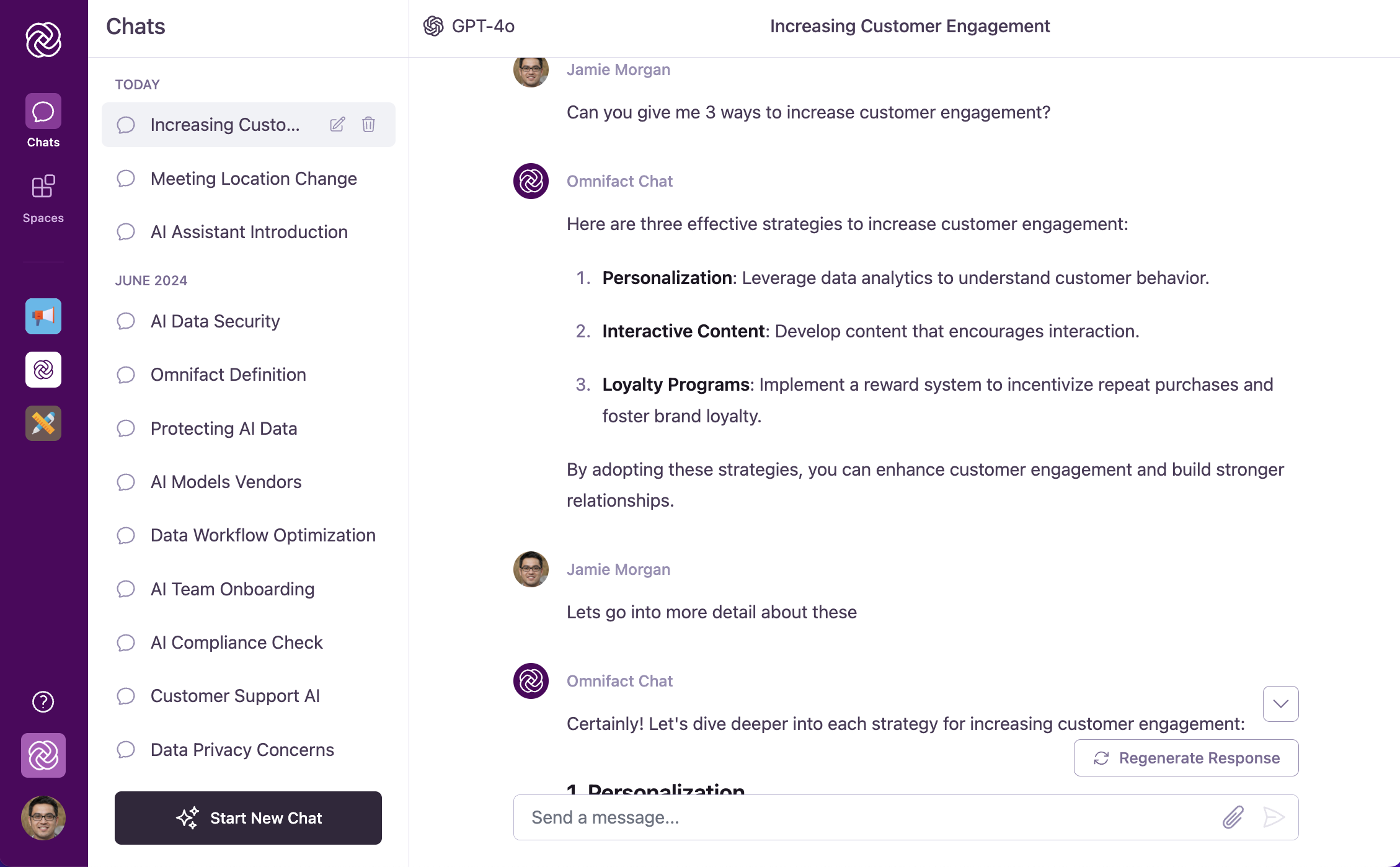 In Omnifact, conversations follow a natural back-and-forth pattern just like chatting with a knowledgeable colleague. What makes this powerful is that the AI assistant keeps track of your entire conversation history within a chat session, allowing for follow-up questions without needing to repeat information.
This natural conversation pattern helps you efficiently navigate from broad questions to specific, actionable information, making even complex topics more accessible and your interactions more productive.
**Pro Tip:** You don't need to repeat yourself! Omnifact remembers what you just said.
Instead of asking: *"Summarize the Q3 Financial Report PDF"* and then *"What were the risks in the Q3 Financial Report PDF?"*
You can just say: *"What were the risks?"*
## The Power of Follow-Up Questions
Follow-up questions are key to getting the most out of Omnifact. They allow you to:
Start with broad questions, then use follow-ups to explore specific aspects
of the topic.
If the AI's response isn't clear or complete, ask follow-up questions to get
the information you need.
Use the AI's answers as a foundation for your next questions, creating a
productive chain of inquiry.
Gradually narrow down broad answers to get precisely what you're looking
for.
## Follow-Up Question Examples
Here are examples of effective follow-up questions in different scenarios:
**Initial Question:**
"Can you help me brainstorm ideas for our summer product campaign?"
**Effective Follow-ups:**
* "Which of these ideas would work best for our target demographic of young professionals?"
* "How should we adapt the messaging for social media channels specifically?"
* "Can you suggest a timeline for implementing the third idea you mentioned?"
**Initial Question:**
"Can you summarize the key points from the quarterly report I just attached?"
**Effective Follow-ups:**
* "What are the most significant changes compared to last quarter?"
* "Can you explain more about the customer retention statistics you mentioned?"
* "What recommendations would you make based on these findings?"
**Initial Question:**
"Can you explain what 'data normalization' means in database management?"
**Effective Follow-ups:**
* "What are the benefits of normalizing data?"
* "Can you give me a simple example of how to normalize a database?"
* "What are the potential downsides of over-normalizing?"
## Tips for Effective Conversations
The more specific your questions, the more relevant Omnifact's answers will
be.
For optimal results, start a new chat when switching to a different topic.
If a response isn't helpful, ask Omnifact to "explain it differently" or "try
another approach."
Remember that follow-up questions work best when they're related to the
current conversation. For completely new topics, starting a fresh chat will
give you better results.
## Context Window Warnings
Every AI model has a maximum memory limit, known as its "context window". This dictates how much of the previous conversation it can remember at any one time.
As your conversation grows very long, you may see a warning banner appear indicating that you are approaching the model's context limit.
* When this happens, the AI may begin to "forget" the earliest messages in your chat.
* While the conversation can continue, you might notice a drop in response quality, speed, or context awareness.
* For optimal performance, we recommend [starting a new chat](/en/platform/core-features/chats/starting-new-chat) when you see this warning, summarizing any necessary context from the previous chat into your first prompt.
## Assistant Actions Timeline
When you send a request to Omnifact, you can observe the step-by-step process in real time:
* **Action Indicators:** During response generation, an ordered list of actions appears above the streaming text.
* **Types of Skills:** You might see the AI *Thinking*, *Searching the web*, *Fetching URL*, *Retrieving from Uploaded Files*, or *Generating image*.
* **Transparency:** Each action shows relevant context, like the exact search query being run or the number of documents retrieved. This transparency helps you verify that the AI is gathering the correct information before it formulates its final answer.
## Next Steps
Now that you understand how conversation flow works in Omnifact, you can:
* Learn about [Attaching Documents](/en/platform/core-features/chats/attaching-documents) to enhance your conversations
* Understand different [Response Modes](/en/platform/core-features/chats/response-modes) to control AI behavior
* Discover how to [Edit Your Messages](/en/platform/core-features/chats/editing-messages) for better clarity
* Explore [Stopping and Regenerating Responses](/en/platform/core-features/chats/stopping-regenerating-responses) when needed
In Omnifact, conversations follow a natural back-and-forth pattern just like chatting with a knowledgeable colleague. What makes this powerful is that the AI assistant keeps track of your entire conversation history within a chat session, allowing for follow-up questions without needing to repeat information.
This natural conversation pattern helps you efficiently navigate from broad questions to specific, actionable information, making even complex topics more accessible and your interactions more productive.
**Pro Tip:** You don't need to repeat yourself! Omnifact remembers what you just said.
Instead of asking: *"Summarize the Q3 Financial Report PDF"* and then *"What were the risks in the Q3 Financial Report PDF?"*
You can just say: *"What were the risks?"*
## The Power of Follow-Up Questions
Follow-up questions are key to getting the most out of Omnifact. They allow you to:
Start with broad questions, then use follow-ups to explore specific aspects
of the topic.
If the AI's response isn't clear or complete, ask follow-up questions to get
the information you need.
Use the AI's answers as a foundation for your next questions, creating a
productive chain of inquiry.
Gradually narrow down broad answers to get precisely what you're looking
for.
## Follow-Up Question Examples
Here are examples of effective follow-up questions in different scenarios:
**Initial Question:**
"Can you help me brainstorm ideas for our summer product campaign?"
**Effective Follow-ups:**
* "Which of these ideas would work best for our target demographic of young professionals?"
* "How should we adapt the messaging for social media channels specifically?"
* "Can you suggest a timeline for implementing the third idea you mentioned?"
**Initial Question:**
"Can you summarize the key points from the quarterly report I just attached?"
**Effective Follow-ups:**
* "What are the most significant changes compared to last quarter?"
* "Can you explain more about the customer retention statistics you mentioned?"
* "What recommendations would you make based on these findings?"
**Initial Question:**
"Can you explain what 'data normalization' means in database management?"
**Effective Follow-ups:**
* "What are the benefits of normalizing data?"
* "Can you give me a simple example of how to normalize a database?"
* "What are the potential downsides of over-normalizing?"
## Tips for Effective Conversations
The more specific your questions, the more relevant Omnifact's answers will
be.
For optimal results, start a new chat when switching to a different topic.
If a response isn't helpful, ask Omnifact to "explain it differently" or "try
another approach."
Remember that follow-up questions work best when they're related to the
current conversation. For completely new topics, starting a fresh chat will
give you better results.
## Context Window Warnings
Every AI model has a maximum memory limit, known as its "context window". This dictates how much of the previous conversation it can remember at any one time.
As your conversation grows very long, you may see a warning banner appear indicating that you are approaching the model's context limit.
* When this happens, the AI may begin to "forget" the earliest messages in your chat.
* While the conversation can continue, you might notice a drop in response quality, speed, or context awareness.
* For optimal performance, we recommend [starting a new chat](/en/platform/core-features/chats/starting-new-chat) when you see this warning, summarizing any necessary context from the previous chat into your first prompt.
## Assistant Actions Timeline
When you send a request to Omnifact, you can observe the step-by-step process in real time:
* **Action Indicators:** During response generation, an ordered list of actions appears above the streaming text.
* **Types of Skills:** You might see the AI *Thinking*, *Searching the web*, *Fetching URL*, *Retrieving from Uploaded Files*, or *Generating image*.
* **Transparency:** Each action shows relevant context, like the exact search query being run or the number of documents retrieved. This transparency helps you verify that the AI is gathering the correct information before it formulates its final answer.
## Next Steps
Now that you understand how conversation flow works in Omnifact, you can:
* Learn about [Attaching Documents](/en/platform/core-features/chats/attaching-documents) to enhance your conversations
* Understand different [Response Modes](/en/platform/core-features/chats/response-modes) to control AI behavior
* Discover how to [Edit Your Messages](/en/platform/core-features/chats/editing-messages) for better clarity
* Explore [Stopping and Regenerating Responses](/en/platform/core-features/chats/stopping-regenerating-responses) when needed