> ## Documentation Index
> Fetch the complete documentation index at: https://docs.omnifact.ai/llms.txt
> Use this file to discover all available pages before exploring further.
# Model Management
> Enable or disable specific AI models to control which models are available to your team.
## Curate Your AI Toolkit
Not every model is right for every team. The **Models** section lets you enable the best tools for your needs while disabling those that don't align with your cost or compliance policies.
### How it Works
The page lists all available models, grouped by their provider (e.g., Azure OpenAI, Google, etc.). Each model has a toggle switch next to it.
* **Enabled:** The model will be available for users to select in the chat interface and can be assigned to [Published Spaces](/en/platform/team-administration/published-spaces) or accessed via the [API Gateway](/en/platform/team-administration/api-gateway).
* **Disabled:** The model will not appear in any [model selection dropdowns](/en/platform/core-features/chats/model-selection) and cannot be used by your team.
You can simply toggle the switch for each model to change its availability instantly.
### Image Generation Models
Image generation models are also managed on the **Models** page. Enable the models you want your team to use and choose the default model for image generation.
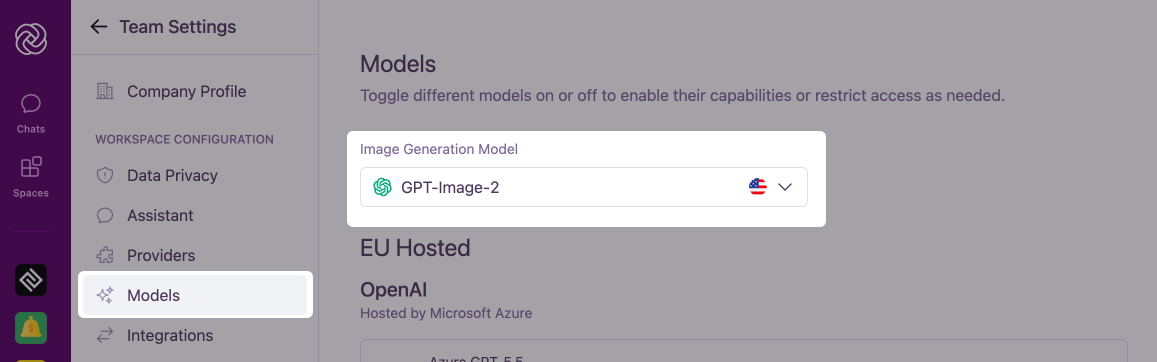 1. Navigate to **Team Settings** > **Models**.
2. Locate the **Image Generation** section.
3. Enable the image models you want available to your team.
4. Select your preferred default model from the dropdown menu.
#### Available Image Models
##### OpenAI Models
* **GPT-Image-2:** OpenAI's latest image model for fast, high-quality generation and editing.
* **GPT-Image-1.5:** Strong prompt adherence and image quality for polished creative work.
* **GPT-Image-1:** High-fidelity general-purpose image generation.
* **GPT-Image-1 Mini:** Cost-effective option balancing speed and quality for everyday visuals.
##### Google Models (Nano Banana)
* **Nano Banana 2:** Fast and efficient model for quick iterations and responsive creative workflows.
* **Nano Banana Pro:** Advanced model for richer compositions and more demanding creative tasks.
* **Nano Banana:** Balanced speed and quality for general-purpose image generation.
Image generation must be enabled for your team before these models can be used. See [Group Management](/en/platform/team-administration/groups#group-permissions) to turn the feature on.
For a guide on how users select these models in the chat interface, see [Selecting an AI Model](/en/platform/core-features/chats/model-selection). For advice on which model to choose, see the [Model Guide](/en/guides/mastering-chat/models/model-guide).
### Model Tiers
Models in Omnifact are categorized into three tiers, which correspond to the permissions you can grant to user groups in [Group Management](/en/platform/team-administration/groups):
* **Base tier:** Foundation models that are available to all users by default. These models provide solid performance for everyday tasks at the lowest cost.
* **Standard:** Highly capable models that offer an excellent balance of performance, speed, and cost.
* **Premium:** The most advanced models in Omnifact, designed for complex reasoning, coding, and highly nuanced tasks. These models are significantly more expensive than standard tier models, and access to them is managed via group permissions.
| Model family | Examples |
| :----------------------------- | :---------------------------------- |
| **Claude Opus** (all versions) | Claude Opus 4.8, 4.7, 4.6, 4.5, 4.1 |
| **GPT-5.6** | GPT-5.6 Sol, Terra, Luna |
| **Gemini 3** | Gemini 3.5 Flash, 3.1 Pro, 3 Pro |
### Model Providers
The models are organized into the following categories:
A selection of models hosted on Microsoft Azure, providing enterprise-grade security and performance.
A wide range of models directly from OpenAI, from the most powerful GPT models to faster, more cost-effective versions.
Includes various versions of Claude, known for their strong performance in complex reasoning and coding tasks.
Features the Gemini family of models, including the latest powerful versions and fast, efficient Flash models.
A variety of open-weight and commercial models from Mistral AI, offering a balance of performance and efficiency.
Support for additional enterprise solutions like Google Vertex AI, Anthropic via Vertex AI, and AWS Bedrock through custom endpoint configurations.
1. Navigate to **Team Settings** > **Models**.
2. Locate the **Image Generation** section.
3. Enable the image models you want available to your team.
4. Select your preferred default model from the dropdown menu.
#### Available Image Models
##### OpenAI Models
* **GPT-Image-2:** OpenAI's latest image model for fast, high-quality generation and editing.
* **GPT-Image-1.5:** Strong prompt adherence and image quality for polished creative work.
* **GPT-Image-1:** High-fidelity general-purpose image generation.
* **GPT-Image-1 Mini:** Cost-effective option balancing speed and quality for everyday visuals.
##### Google Models (Nano Banana)
* **Nano Banana 2:** Fast and efficient model for quick iterations and responsive creative workflows.
* **Nano Banana Pro:** Advanced model for richer compositions and more demanding creative tasks.
* **Nano Banana:** Balanced speed and quality for general-purpose image generation.
Image generation must be enabled for your team before these models can be used. See [Group Management](/en/platform/team-administration/groups#group-permissions) to turn the feature on.
For a guide on how users select these models in the chat interface, see [Selecting an AI Model](/en/platform/core-features/chats/model-selection). For advice on which model to choose, see the [Model Guide](/en/guides/mastering-chat/models/model-guide).
### Model Tiers
Models in Omnifact are categorized into three tiers, which correspond to the permissions you can grant to user groups in [Group Management](/en/platform/team-administration/groups):
* **Base tier:** Foundation models that are available to all users by default. These models provide solid performance for everyday tasks at the lowest cost.
* **Standard:** Highly capable models that offer an excellent balance of performance, speed, and cost.
* **Premium:** The most advanced models in Omnifact, designed for complex reasoning, coding, and highly nuanced tasks. These models are significantly more expensive than standard tier models, and access to them is managed via group permissions.
| Model family | Examples |
| :----------------------------- | :---------------------------------- |
| **Claude Opus** (all versions) | Claude Opus 4.8, 4.7, 4.6, 4.5, 4.1 |
| **GPT-5.6** | GPT-5.6 Sol, Terra, Luna |
| **Gemini 3** | Gemini 3.5 Flash, 3.1 Pro, 3 Pro |
### Model Providers
The models are organized into the following categories:
A selection of models hosted on Microsoft Azure, providing enterprise-grade security and performance.
A wide range of models directly from OpenAI, from the most powerful GPT models to faster, more cost-effective versions.
Includes various versions of Claude, known for their strong performance in complex reasoning and coding tasks.
Features the Gemini family of models, including the latest powerful versions and fast, efficient Flash models.
A variety of open-weight and commercial models from Mistral AI, offering a balance of performance and efficiency.
Support for additional enterprise solutions like Google Vertex AI, Anthropic via Vertex AI, and AWS Bedrock through custom endpoint configurations.