

Enterprise AI with Built-In Privacy
Omnifact is a secure platform designed for workplace productivity and data protection. It provides AI assistance directly within professional workflows, enabling teams to analyze documents, automate content creation, search the web in real time, and query internal knowledge while enforcing strict data privacy safeguards.Core Concepts & Architecture
To get the most out of Omnifact, it helps to understand how the pieces work together. You always talk to the Omnifact Agent, the conversational AI that answers prompts, helps with writing, and searches the web. You can work with that agent in two places:- Chats are general conversations for everyday writing, brainstorming, and one-off file analysis.
- Spaces are dedicated workspaces for a topic, project, or team. Each Space can include custom Chat Instructions, assigned members and permissions, and its own Knowledge Base.
Agent
The conversational AI that answers your prompts, helps with writing, and searches the web.
Chats
General conversations with the agent for day-to-day writing, brainstorming, and ad-hoc file analysis.
Spaces
Dedicated workspaces configured with custom instructions, assigned members, and an isolated Knowledge Base.
Space Knowledge Base
The domain library inside a Space, combining Uploaded Files (manually uploaded files) and Connected Sources (auto-synced cloud folders).
Chat Attachments vs. Space Knowledge: Files attached directly to a chat message are ephemeral and scoped to that specific conversation. Documents uploaded to a Space Knowledge Base are indexed permanently for all members of that Space to query across multiple conversations.
Why Organizations Choose Omnifact
Unlike public AI tools, Omnifact provides enterprise-grade data privacy and administrative governance:- Privacy-first architecture: Omnifact detects and replaces supported sensitive data (PII, financial identifiers, and entity records) before prompts are transmitted to external model providers, and re-inserts original data into the response.
- Compliance and security: Designed for GDPR compliance and enterprise data protection standards. Documents and prompts are never used to train external foundation models.
- Customizable team agents: Create role-specific agents in with custom instructions and dedicated Knowledge Bases.
- Multi-model flexibility: Access leading models from OpenAI, Anthropic, Google, Mistral AI, and Azure OpenAI through a single, governed interface.
- Enterprise governance: Role-based permissions, SCIM group provisioning, and granular model enablement.
Key Capabilities
Document & Data Analysis
Attach spreadsheets, PDFs, or presentations to extract metrics, identify trends, and generate custom visualizations.
Domain-Specific Spaces
Collaborate with colleagues in dedicated environments where the agent references your team’s specific documents and guidelines.
Web Search & Browsing
Retrieve verified, real-time web facts and citations with automated privacy filtering for search queries.
Protected AI Processing
Safeguard personal and corporate data with automated masking and Click to Reveal transparency.
Integrations & MCP Tools
Connect cloud storage (Google Drive, OneDrive, SharePoint) and over 35 workplace tools (Slack, Jira, GitHub, HubSpot) via Model Context Protocol. Browse our public Integrations Catalog to explore all supported services.
The Omnifact Interface
The platform uses a clear, two-column layout: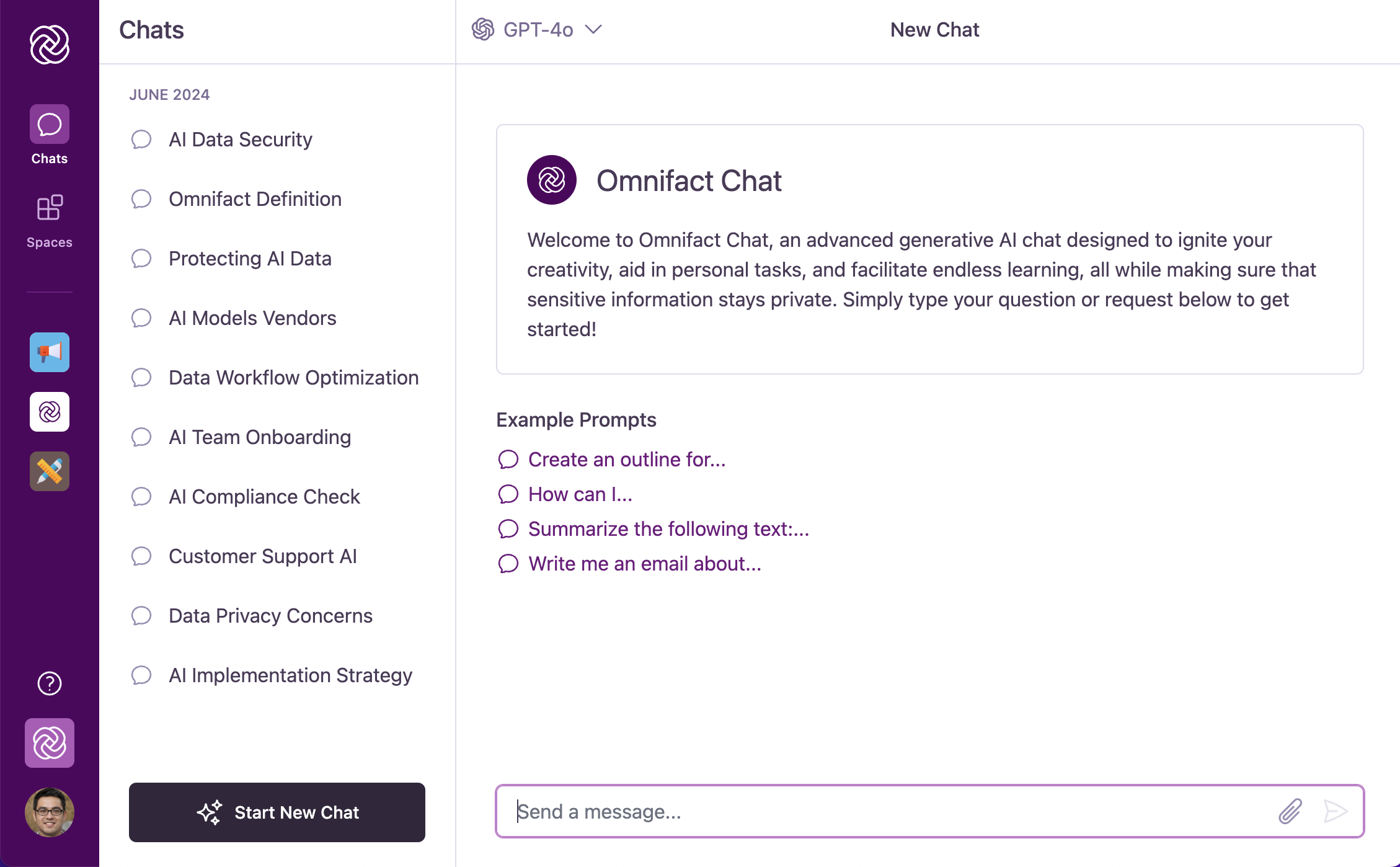
- Main Navigation Bar (Left): Switch between Chats, Spaces, and (when image generation is enabled) Images. Open Settings from your avatar, or Team Settings if you are an administrator.
- Main Content Area (Right): View active conversation threads, switch AI models, or configure Space settings.
Get Started
Quickstart Guide
Complete your first conversation and model selection in 5 minutes.
Admin Quickstart
Turn on Document Creation, configure EU model access, and set spending limits in 10 minutes.
Data Residency & Compliance
Review EU vs. US model flags, Zero Data Retention status, file storage, and Trust Center documents.
Coming from ChatGPT & FAQ
See how Omnifact compares to ChatGPT and get answers to the most common customer questions.