

Model Guide
Choose the right AI model for your task, from flagship reasoning models to fast, efficient options.
The available models are configured by your Team Administrator in Model Management. If you don’t see a specific model, it may not be enabled for your organization. Your administrator can also restrict availability to EU-hosted models only to ensure data residency compliance.
How to Switch Models
You can select the AI model before you send a message or at any point during a conversation directly in the chat input area.1
Locate the Model Selector
In the bottom-right corner of the chat input field (next to the send button), look for the Model Selector pill button. It displays the provider logo and the name of the currently active model (e.g., “GPT-5.6 Sol” or “Claude Sonnet 5”). For reasoning models, it also shows the current reasoning effort level.
2
Open the Menu
Click the model selector to reveal the list of available models. Each model shows its provider logo, name, and hosting region flag. Hover over a model to see a short description beside the menu. For reasoning models, the Reasoning Effort row appears at the bottom of the menu.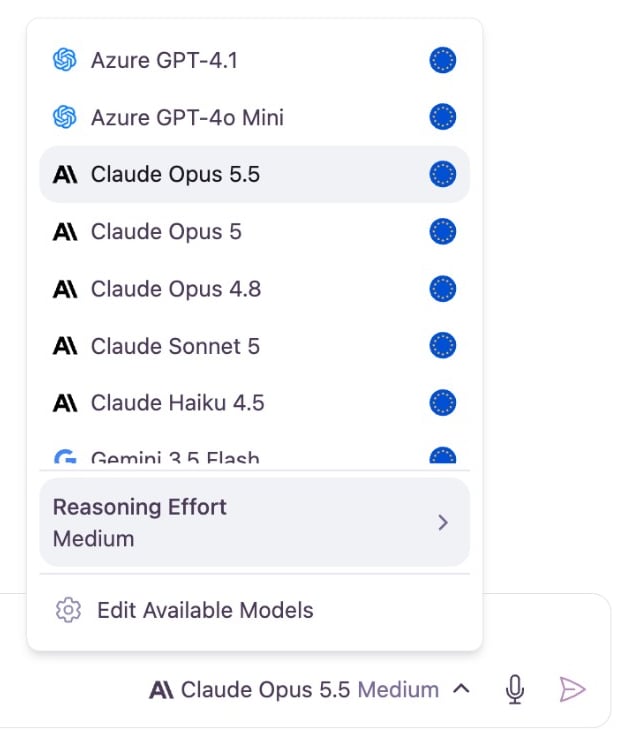
3
Choose a Model
Select the model you wish to use. The selector in the input bar will update to reflect your choice, and all subsequent messages in that conversation will be processed by the selected model.
Configuring Reasoning Effort
Reasoning models (such as GPT-5.6 Sol, GPT-5.4, or Gemini 3.5 Flash) spend extra compute time “thinking” through problems step by step before generating an answer. Instead of jumping straight to a response, they evaluate intermediate logic, explore hypotheses, and verify constraints. When you select a reasoning-capable model, Omnifact displays a Reasoning Effort picker directly in the footer of the model menu. This gives you precise control over how much deliberation the model applies to your prompt.Adjusting the Effort Level
To adjust the thinking depth of an active reasoning model:1
Select a Reasoning Model
Open the Model Selector in the chat input and pick a reasoning-capable model. The Reasoning Effort row appears at the bottom of the popover menu, beneath the model list.
2
Open the Effort Menu
Hover over or focus on the Reasoning Effort row to open the flyout submenu. On mobile devices and smaller screens, the effort options appear inline directly in the menu.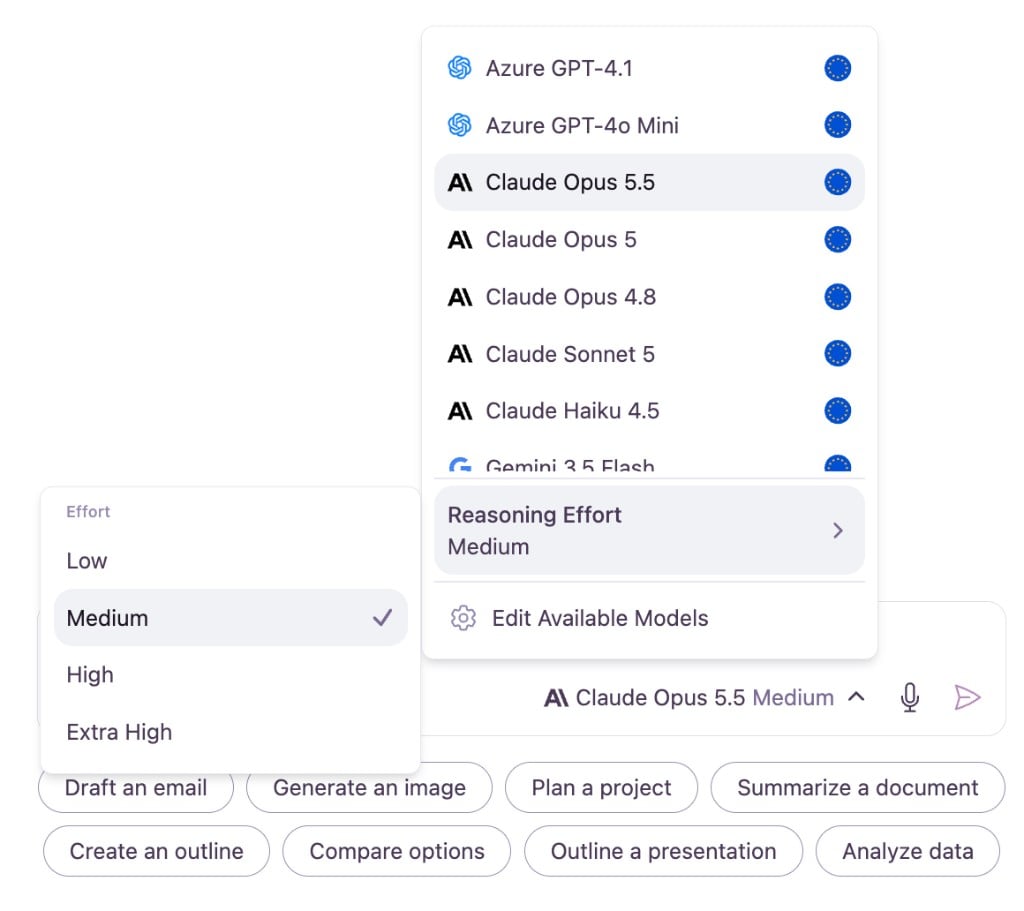
3
Choose an Effort Level
Click your preferred effort level. A checkmark confirms your active selection, and both the menu footer and the model selector in the chat input update to show the selected level (for example, “Claude Opus 5.5 Medium”).
Effort Levels Explained
Different tasks benefit from different amounts of deliberation. Omnifact supports up to four reasoning effort levels, depending on what the active model accepts:Model-Specific Availability: Each AI model defines which effort levels it natively supports. For example, some models accept Low, Medium, and High, while others also support Extra High. The reasoning flyout automatically shows only the options available for your selected model. For non-reasoning models, the Reasoning Effort row is hidden entirely.
Per-Model Memory and Automatic Clamping
Omnifact manages your reasoning settings automatically across conversations:- Saved per Model: Your preferred effort level is saved in your browser for each model individually. When you switch back to a previously configured model, your preferred setting is restored.
- Automatic Downgrade (Clamping): If you switch from a model set to Extra High to a model that only supports up to High, Omnifact automatically clamps your setting to the nearest supported level. If two supported levels are equidistant, Omnifact selects the lower, more cost-effective option.
- Clean Interface: When switching back to a standard model, the reasoning controls disappear automatically, keeping your interface simple and focused.
Inspecting the Reasoning Trace
When a reasoning model responds in chat, you can review its thought process:- Thinking Status: While the agent is working, an in-chat status indicator displays “Thinking…” to show that reasoning is actively underway.
- Expandable Reasoning Block: Above the final answer, Omnifact displays a collapsible Thinking card.
- Inspect the Logic: Click Show More to expand the step-by-step reasoning trace, or Show Less to collapse it. This allows you to verify the model’s intermediate deductions, assumptions, and calculations.
Why Switch Models?
Different AI models are trained differently and have unique strengths. Switching models can help you optimize your results based on what you are trying to achieve.
For a comprehensive guide on which model to choose for specific tasks, see the Model Guide.