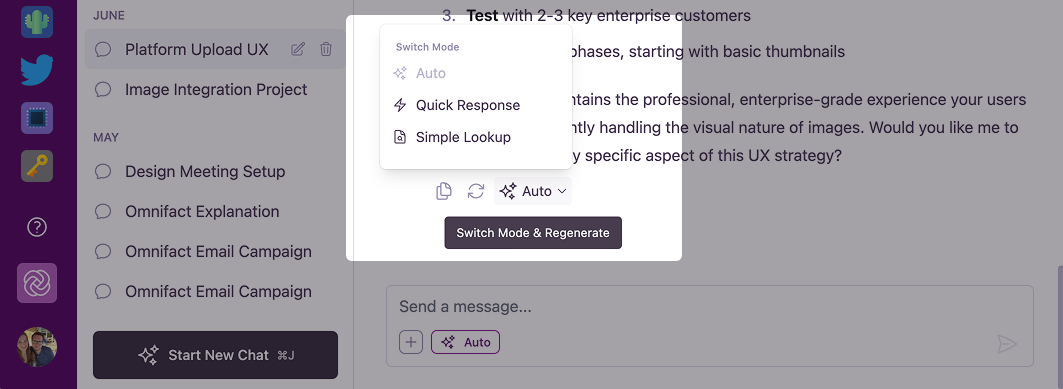
Available Modes
There are three response modes available in the chat interface: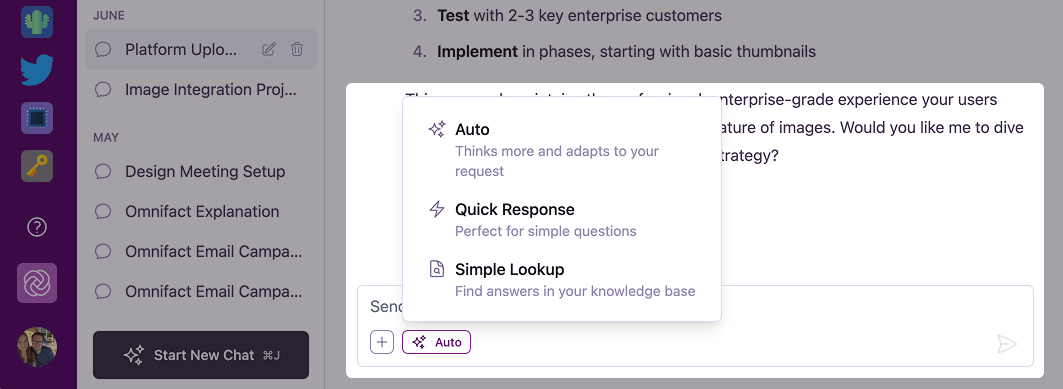
Auto
The default mode. Uses all available capabilities to provide the most comprehensive answer.
Quick Response
Fast and direct. Best for simple questions that don’t require external tools or document search.
Simple Lookup
Strictly uses your Uploaded Files. Only answers based on the documents you have uploaded.
Auto Mode (Default)
This is the most powerful mode and is selected by default. In Auto mode, the AI “thinks” more about your request and autonomously decides which tools to use.- Capabilities: Can search the web, retrieve documents from your Uploaded Files, generate images, and fetch URLs.
- Best for: Complex questions, research, tasks requiring up-to-date information from the web, or when you’re unsure which mode to use.
Quick Response
Quick Response is designed for speed. The AI answers directly from its internal training data without using any extra tools (like web search or document retrieval).- Capabilities: Fast text generation only. No web search or Uploaded Files access.
- Best for: General knowledge questions, brainstorming, drafting emails, or when you need an immediate answer without waiting for tool processing.
Simple Lookup
Simple Lookup focuses exclusively on your internal data. It forces the AI to answer only using the information found in the Space’s Uploaded Files without any web search or other tools.- Capabilities: Retrieves information strictly from uploaded documents. No web search or other tools.
- Best for: Answering specific questions about company policies, technical specifications, or any query where you want to avoid “hallucinations” or outside information.
- Note: This mode is only available in Spaces that have a Uploaded Files with documents uploaded.
Switching Modes
You can change the response mode at any time before sending a message. The selected mode applies to the next message you send.1
Locate the Mode Selector
Look for the Response Mode button in the bottom-left corner of the chat input area (it will show the icon of the current mode).
2
Select a Mode
Click the button to open the menu and select the desired mode from the list.
3
Send Your Message
Type your message and press Enter. The AI will process it using the selected mode.