Extend AI Capabilities
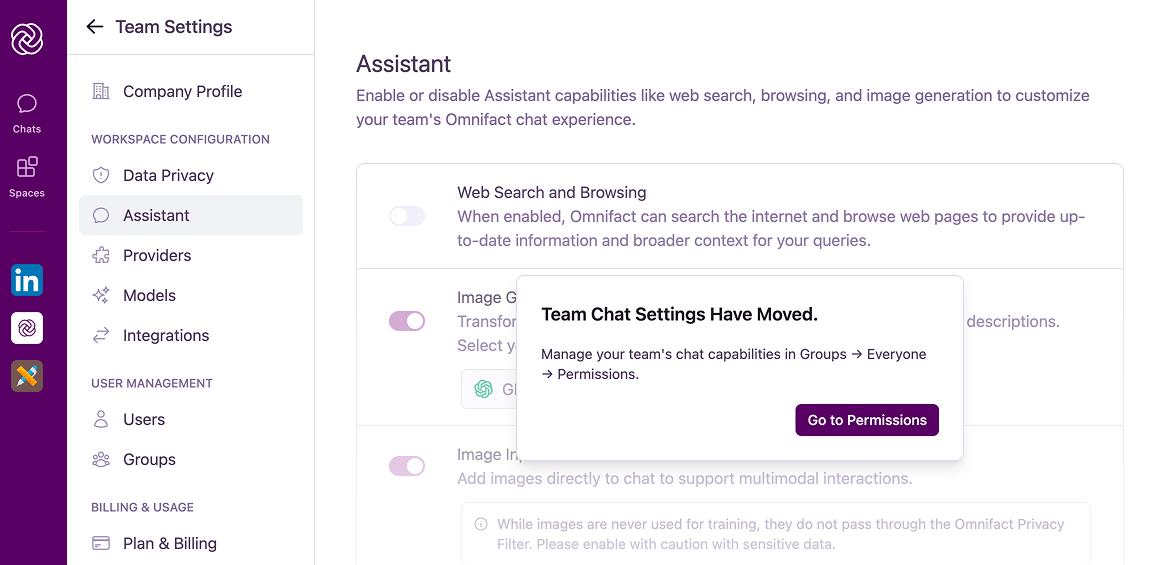
Customize what your AI assistant can do. The Assistant settings page lets you toggle advanced features like Web Search and Image Generation, giving you control over the balance between capability and security. By default, all additional capabilities are disabled.
Available Capabilities
Web Search and Browsing
When enabled, this allows Omnifact to search the internet and browse web pages. This capability is useful for providing up-to-the-minute information and gathering broader context for user queries that cannot be answered by the selected AI model alone.
Image Generation
Enabling this feature allows users to transform their ideas into visuals. You can configure the default image generation model for your team.
Image Input (Experimental)
This experimental feature allows users to add images directly into a chat to support multimodal interactions, such as asking questions about a chart or diagram.
Audio Input (Experimental)
This experimental feature allows users to add audio files directly into a chat to support multimodal interactions with audio-capable models.
Inline Sources (Experimental)
Display source citations inline within the assistant’s response for better context and attribution.
Configure Default Image Model
You can choose the specific image generation model that your team uses.- Navigate to Team Settings > Assistant.
- Locate the Image Generation section.
- Select your preferred provider and model from the dropdown menu.
Available Models
- GPT-Image-1: OpenAI’s flagship model, known for its versatility and photorealistic results.
- Nano Banana: A high-speed, creative model perfect for rapid iteration and stylized outputs.
- Nano Banana Pro: The premium version for professional workflows, featuring higher resolution, intricate detail retention, and advanced composition control.